Blogs /
Marketing Strategy
As travel demand evolves, hotel marketing is no longer just about visibility—it’s about being discovered where booking decisions are made. This report explores how search, social, and AI are reshaping guest acquisition.
By Shahar Rubin, Co-founder

I’d start with one AI tactic that helps boost hotel direct bookings - and measure profit, not just reservations. First, check your rates, inventory, and guest data, and keep checkout to 3 steps or fewer.
Here are the seven ways I’d put AI to work:
Reach likely guests: Match ads, offers, and booking pages to what travelers want.
Answer booking questions: Use current rates and policies to suggest 2–3 rooms and a direct-booking link.
Tailor offers: Use guest-approved history and preferences to suggest packages or upgrades.
Send useful stay messages: Help guests before arrival, during their stay, and after checkout.
Show loyalty rates: Display the member rates and perks each guest qualifies for.
Offer enrollment rewards: Give guests one clear incentive, with costs and limits checked first.
Follow up on unfinished bookings: Send permitted reminders with links to resume checkout, and stop once guests book.
My rule: <u>keep staff in control</u>. Use verified property details, respect messaging consent, and send payment problems, refunds, and safety concerns to staff. Then subtract ads, discounts, rewards, and cancellations from results. More bookings only help if the profit holds up.
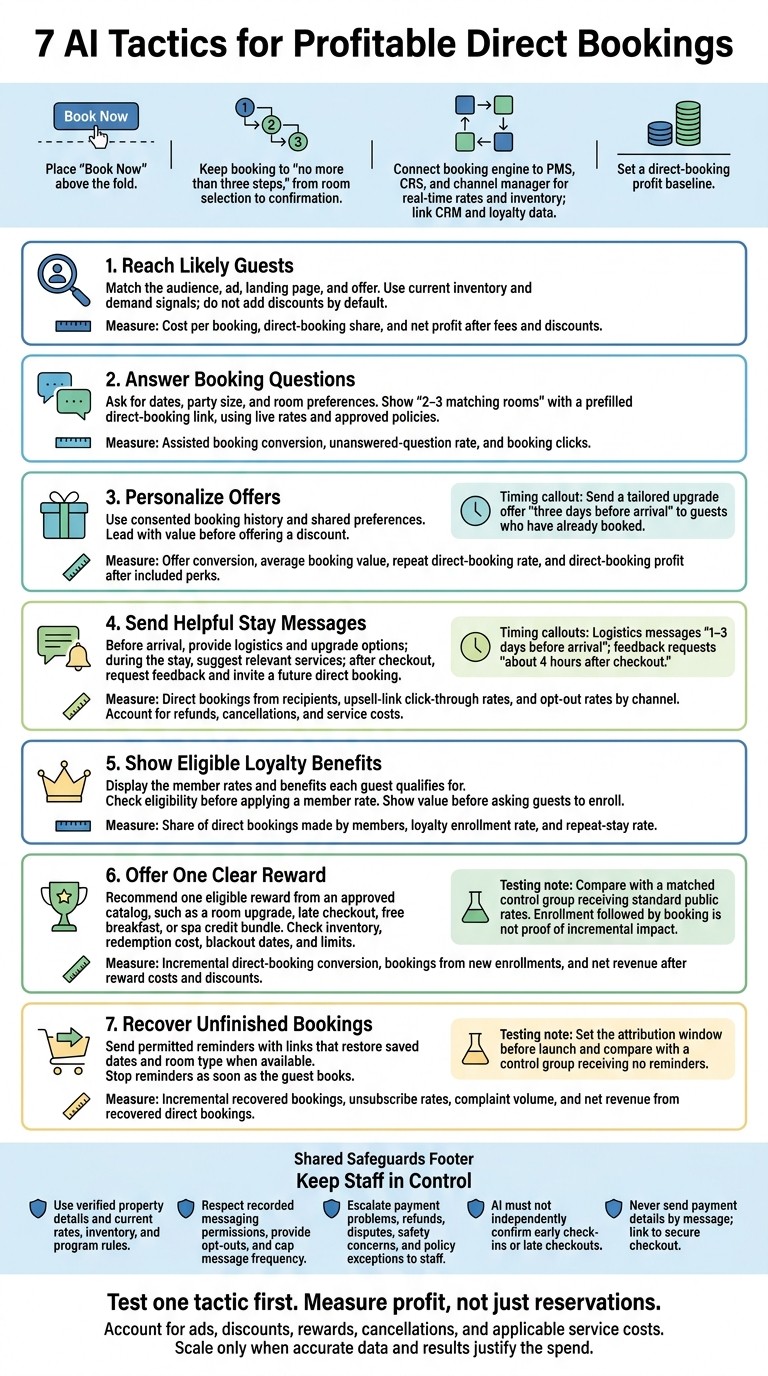
7 AI Tactics for Profitable Direct Bookings
Prepare Your Booking Systems and Guest Data
Place “Book Now” above the fold and keep booking to no more than three steps, from room selection to confirmation. This helps AI-driven traffic turn into bookings quickly. A clear booking path and clean data let AI work with accurate rates, inventory, and guest details.
Connect your booking engine to the PMS, CRS, and channel manager for real-time rates and inventory. Link CRM and loyalty data, too, so AI can tailor offers to guest history, preferences, and special occasions, such as birthdays.
Use consistent country, currency, and local time zone settings across booking, advertising, and reporting systems. Schedule reminders and last-minute offers in the property’s local time zone so guests receive them when they can act.
Set data and messaging rules before launch. Record consent, limit staff access, define retention periods, and cap message frequency to protect guest trust and reduce opt-outs. Check automated email and text workflows against CAN-SPAM, TCPA, and U.S. privacy rules. Assign one staff member to handle escalations, and pass along the conversation summary and all guest details.
Set a direct-booking profit baseline before adding AI campaigns. Track completed bookings, cancellations, marketing costs, and loyalty benefits. Measure profit - not just room revenue - to help AI target the right guests with the right offer.
1. Reach Likely Guests with AI Campaigns
Once your rates and guest data are clean, use AI campaigns to reach travelers earlier in their booking journey. Sail can run AI-driven campaigns across Facebook, Instagram, and metasearch, reaching travelers as they compare options and get ready to book.
Match Ads to Guest Intent
Match the audience, ad, landing page, and offer. Show room images and other relevant visuals to travelers who are comparing options. For those ready to book, show real-time rates and availability.
Keep the offer the same from the ad through the booking page. Use inventory and demand signals to decide whether a discount or loyalty offer is needed - not just add one by default.
Live Data, Tracking, and Approval
With the audience and offer set, connect live inventory and tracking. Check feeds regularly for outdated rates, closed inventory, and broken tracking.
Require staff approval for major budget or pricing changes before launch. These checks help keep campaigns aligned with revenue goals.
Booking and Profit Metrics
Track cost per booking, direct-booking share, and net profit after fees and discounts.
2. Answer Booking Questions with Conversational AI
Connect live rates and inventory so conversational AI can answer questions when a guest is ready to book.
Guest Intent and Direct Bookings
Ask for dates, party size, and room preferences. Then show 2–3 matching rooms with a prefilled direct-booking link. Mention only verified direct-booking perks that apply to the guest’s booking.
Setup Steps and System Connections
Use APIs to connect the assistant to your PMS and booking engine so it can check inventory, rates, and availability in real time. Build its knowledge base from approved property details and policies, and keep answers limited to those sources.
Parking: Confirm availability, fees, and restrictions.
Cancellation: Explain the cancellation terms for the selected rate.
Accessibility: Verify room features and availability before sharing a booking link.
Human handoff: Let AI answer simple booking questions. If it can’t answer, or the request involves an exception, payment issue, or safety concern, it should tell the guest and hand the conversation to staff.
Once connected, keep the assistant’s answers short, factual, and focused on the next booking step.
Consent, Data Accuracy, and Staff Review
Set up staff review for sensitive replies. Assign staff to review policy updates and check logs of unanswered questions and escalated conversations weekly to help the assistant improve. Track assisted booking conversion, unanswered-question rate, and booking clicks.
3. Personalize Offers with First-Party Guest Data
Guest Intent and Direct Bookings
Once the booking question is answered, use consented booking history and shared preferences to shape an offer that fits the guest’s intent.
Match business travelers with express check-in or meeting-room access, families with breakfast or upgrades, leisure guests with spa packages or local activities, and repeat guests with familiar add-ons.
Lead with value before offering a discount.
Setup Steps and System Connections
Connect guest profiles across your PMS, CRS, booking engine, and loyalty profiles so your offer engine has the right data. Use stay length, booking window, and previous add-ons to help AI choose relevant packages and upgrades. For guests who’ve already booked, send a tailored upgrade offer three days before arrival.
Consent, Data Accuracy, and Staff Review
Collect only the preferences needed for the offer, and stay within the permissions already recorded in the guest’s profile. Don’t guess checkout times, policies, or other details. Have staff review AI-drafted offers before sending them, especially if they include a complimentary upgrade.
Booking and Profit Metrics
Measure each offer’s effect on profit. Track offer conversion - the share of recipients who book or upgrade. Also track average booking value and repeat direct-booking rate, and calculate direct-booking profit after subtracting the cost of included perks.
4. Send Helpful Messages Throughout the Stay
Once AI helps guests book, keep it useful before arrival, during their stay, and after checkout.
Guest Intent and Direct Bookings
Match each message to the guest’s stage of the stay. Before arrival, cover transportation, parking, check-in, and upgrade options. During the stay, suggest dining or spa services. After checkout, ask for feedback and add a brief invitation to book directly again. Address what guests need now while giving them a reason to book directly later - without turning every message into a sales pitch.
Setup Steps and System Connections
Connect messaging to the PMS for stay details, the booking engine for reservation changes, and the point-of-sale system for orders. Give staff a unified inbox to view guest history and replies in one place.
Schedule logistics messages 1–3 days before arrival and feedback requests about 4 hours after checkout. Use send-time optimization and frequency caps across channels to prevent overlapping prompts.
Consent, Data Accuracy, and Staff Review
Use only channels covered by the guest’s recorded permissions. Ground every reply in current property information, including parking instructions and Wi-Fi access, so AI doesn’t invent details.
Send billing disputes, refunds, and room moves to staff for review. Never let AI confirm early check-ins or late checkouts on its own.
Booking and Profit Metrics
Track direct bookings from message recipients - not conversation volume. Measure click-through rates on upsell links and opt-out rates by channel. Subtract refunds, cancellations, and service costs from attributed revenue. If opt-outs increase, send fewer messages or change their timing.
5. Connect AI to Loyalty Rates and Benefits
Use loyalty data to help returning guests and new sign-ups book directly.
Guest Intent and Direct Bookings
Recognize signed-in members and display the member rates and benefits they qualify for during booking. Use stay patterns and past preferences to highlight the loyalty benefit most likely to lead to a booking.
For nonmembers, offer enrollment when an immediate discount or eligible benefit gives them a clear reason to join. Show the value before asking guests to enroll.
Setup Steps and System Connections
Connect AI to the PMS, online booking engine, and loyalty records so guests can see member rates, tier status, and reward balances as they book. Have the booking system check eligibility before applying a member rate.
Consent, Data Accuracy, and Staff Review
Protect account details. Use current program rules to guide recommendations. Send unclear eligibility questions to staff, and have AI state when it can't confirm an answer.
Booking and Profit Metrics
Track the share of direct bookings made by members, the loyalty enrollment rate, and the repeat-stay rate.
6. Offer Rewards at Enrollment or Booking
Guest Intent and Direct Bookings
Once you’ve shown the value of membership, offer one clear reward that encourages guests to book now:
Offer a room upgrade, late checkout, free breakfast, or a spa credit bundle.
Choose the reward based on occupancy, season, redemption cost, and expected guest value. During shoulder season, bundle room nights with spa credits or local experiences to protect room rates.
Setup Steps and System Connections
Give AI an approved reward catalog that includes eligibility rules and available inventory. Let it recommend only offers that meet those requirements. Test rewards by season and occupancy level instead of using the same incentive for every booking.
Consent, Data Accuracy, and Staff Review
Show blackout dates and any eligibility or availability limits before guests accept a reward. Require staff approval for exceptions, discounts, or complimentary benefits that fall outside the approved rules.
Booking and Profit Metrics
Compare guests who receive the offer with a matched control group receiving standard public rates. Track incremental direct-booking conversion rates, bookings from new enrollments, and net revenue after reward costs and discounts. Bookings after enrollment are a signal - not proof that the reward drove an increase.
If the guest still hasn’t booked, follow up promptly before they abandon the reservation.
7. Recover Abandoned Bookings with Helpful Follow-Up
Guest Intent and Direct Bookings
When a guest leaves before completing a booking, a helpful follow-up can bring them back. Use opt-in tracking to identify what likely stopped them. Then let AI send approved rate, availability, and cancellation details that address the issue.
Setup Steps and System Connections
Connect the recovery flow to live inventory and saved guest details. Link the booking engine, PMS, and messaging platform so direct-booking recovery links restore the guest’s saved dates and room type when available. Include saved loyalty benefits, and stop reminders as soon as the guest completes a booking.
Consent, Data Accuracy, and Staff Review
Document the legal basis for follow-up messages, provide a clear opt-out, and limit how often you send reminders. Never send payment details by message. Direct guests to secure checkout instead. Send unresolved payment or policy questions to staff with a brief summary.
Booking and Profit Metrics
Set the attribution window before launch. Once reminders are running, compare results with a control group that receives no reminders to see whether follow-ups recover bookings. Track incremental recovered bookings, unsubscribe rates, and complaint volume, along with net revenue from recovered direct bookings.
Conclusion: Test One Tactic and Measure Booking Profit
AI can make the direct-booking process easier by removing barriers between interest and booking.
Test one tactic first.
Start small: If unanswered website questions are creating friction, start with after-hours FAQ assistance.
Use approved property details and have staff review the pilot. Track direct-booking conversion and front-desk inquiry volume before adding another tactic.
Measure profit, not just reservations. Include campaign costs, discounts, rewards, and cancellations when reviewing booking results. Track upsell revenue per booking conversation, too. More bookings shouldn't mean less net profit.
Scale only when the data is accurate and the numbers justify the spend. Review failed conversations each week to spot missing answers, and check staff handoffs weekly. Staff should handle disputes, refunds, and safety issues.
Make automation helpful and easy to exit. Keep loyalty enrollment optional and staff contact one click away, so guests can book with less friction without losing control of their choices.
FAQs
Which AI tactic best fits my hotel's booking challenges?
Review your guest interactions to find where you’re losing the most potential revenue. Then choose the AI tactic that fits the problem:
Low website conversions: Use an AI chatbot to check availability instantly, suggest rooms based on guest preferences, and provide 24/7 support.
Abandoned bookings or low repeat business: Send automated follow-up emails.
Competition from OTAs: Use AI-driven marketing campaigns to boost visibility and direct bookings without upfront ad spend.
How long should I test AI before scaling?
There’s no set timeline for scaling AI in your hotel marketing. Review conversion rates, ad spend, and booking volume regularly to see how campaigns perform. Adjust bids and budgets based on real-time data and seasonal demand.
Sail’s risk-free model lets you keep testing AI-driven campaigns without upfront costs or long-term commitments.
How can I distinguish AI-driven bookings from bookings I'd get anyway?
Use the analytics and reporting tools in your booking engine or AI assistant platform to track conversations, qualified leads, and conversion rates. These metrics help you spot bookings that began with an AI-led interaction.
Review conversation logs to see how the AI answered inquiries. Look at how its instant, personalized responses helped browsing visitors become confirmed guests - rather than leaving your site or booking through an online travel agency (OTA).
Related Blog Posts
Share:
20 years of hospitality lessons. No fluff. No spam
Join 500+ hospitality pros getting our best growth playbooks.

hi@sailtech.ai
RESOURCES
Products
Free Tools
© 2026 Sail. All rights reserved.