Blog /
Marketing Strategy
Pilot AI phone agents for hotel bookings: verify PMS reservations, secure payments, manage staff handoffs, and track costs.
By Shahar Rubin, Co-founder

AI phone agents can answer calls 24/7 - but I count a room as booked only after the reservation is verified in the hotel’s system. Before taking guest calls, I’d test live rates, booking permissions, secure payments, and transfers to staff.
My starting point: a 30-day pilot on one line or for after-hours calls. Here’s what I’d check:
System access: Can the agent quote current rates and create a reservation without duplicate bookings?
Guest experience: Does it explain the full price and terms, confirm details, and send confirmation only after the booking posts?
Staff support: Can callers reach a person, with booking details passed along and urgent issues routed correctly?
Costs and privacy: What will setup, calls, support, and staff follow-up cost - and how will guest data stay protected?
Results: How many inquiries become direct hotel bookings, what does each booking cost, and which errors need fixing?
The goal isn’t just fewer calls for staff. It’s <u>verified bookings, clear handoffs, and staff in control</u>.
Step 1: Check Integrations, Costs, and Staff Roles
Check Inventory Access and Booking Permissions
Confirm which system controls availability, rates, restrictions, and reservation records. Then test the live integration - don’t rely on the feature list.
Give the agent a dedicated account with permissions limited to its tasks. Reading inventory doesn’t require access to cancel bookings or override rates. Those permissions determine whether the agent can move from a quote to a confirmed reservation. Quote only live system rates.
Before launch, document what to do if a connection fails or a reservation write returns no confirmation. Check the reservation record before retrying to avoid duplicate bookings. Send unresolved cases to staff.
Calculate Setup and Running Costs
Ask for an itemized quote covering setup, integrations, subscriptions, phone numbers, call usage, transfers, payment processing, support, and maintenance. Costs depend on the connections and workflows you need.
During a pilot, compare the full cost with measured staff time saved - not call volume alone. Subtract time spent on staff follow-up, and don’t count every phone reservation as new revenue.
Assign Tasks and Escalation Owners
Use this responsibility map to set permissions and name an owner for every exception. Automation should stop where system support or approved policy ends. Assign a backup for each shift so unresolved issues reach a person instead of triggering repeated guesses.
Task | Automated handling | Staff handling | Escalation owner |
|---|---|---|---|
Availability | Read current inventory and restrictions | Resolve missing or conflicting availability data | Reservations manager |
Quotes | Offer approved, eligible rates | Review restricted rates and discount requests | Revenue manager |
New bookings | Create supported reservations and return confirmation | Handle group requests and uncertain writes | Reservations manager |
Changes | Make authorized changes | Resolve unsupported changes or exceptions | Front desk manager |
Cancellations | Apply supported cancellation rules | Review exceptions | Duty manager |
Payments | Use approved, secure payment capture | Resolve payment failures | Duty manager |
Policy exceptions | Collect details without promising approval | Approve or decline the request | Duty manager |
Set Privacy and Call Recording Rules
Document which guest data you collect, who can access it, how long you keep it, when you delete it, and what the vendor is responsible for. Review applicable privacy and call recording requirements with legal guidance.
Require evidence of SOC 2 Type II security controls and PCI DSS-compliant payment handling. Keep payment credentials and other sensitive details out of recordings, transcripts, and notes.
Omnichannel Hotel Booking AI Agent
Step 2: Set Up Booking Calls and Staff Handoffs
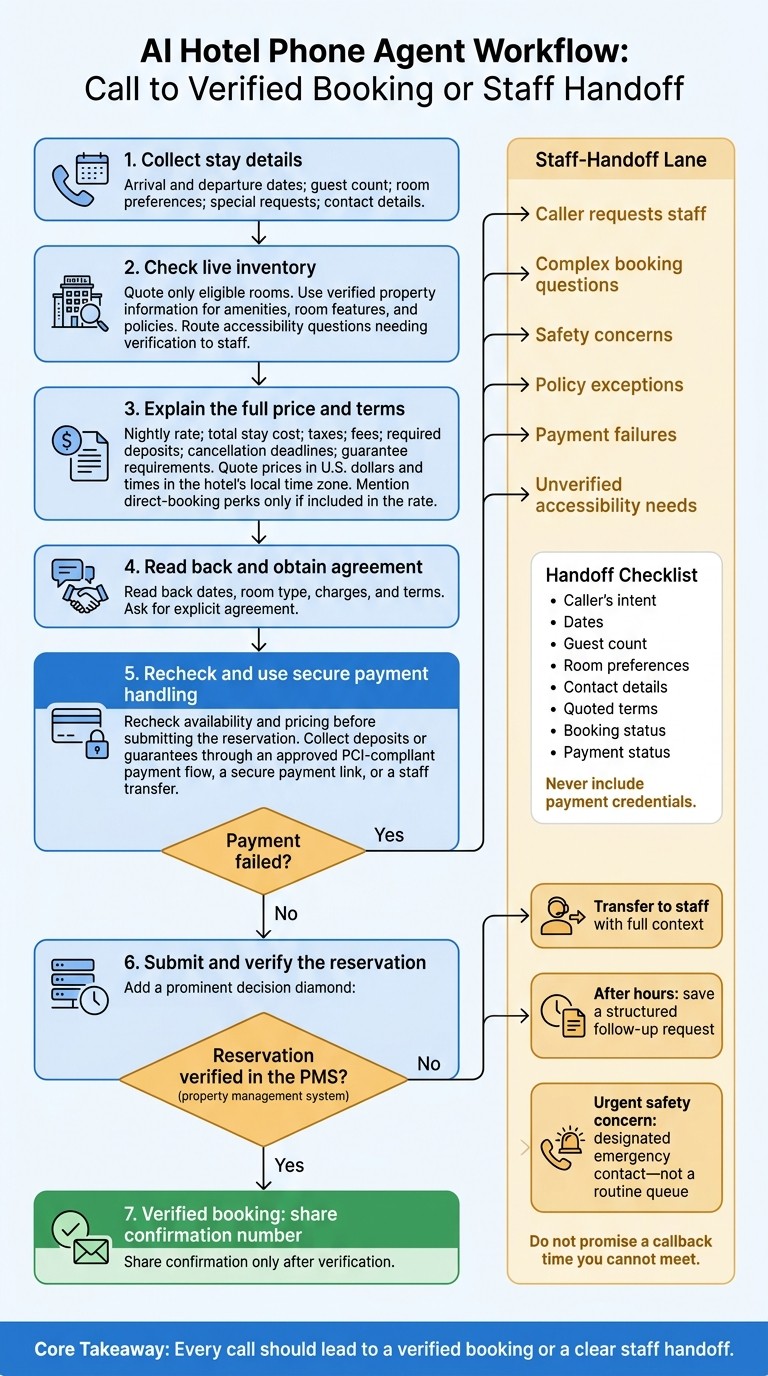
AI Hotel Phone Booking: From Call to Verified Reservation
Once permissions and escalation owners are set, the agent can move from quote to reservation.
Collect Stay Details and Quote Rooms
Ask for arrival and departure dates, guest count, room preferences, special requests, and contact details. Check live inventory and quote only eligible rooms. Use verified property information when discussing amenities, room features, and policies. Send accessibility questions that need verification to staff.
Make the full cost clear: state the nightly rate, total stay cost, taxes, fees, and required deposits. Explain cancellation deadlines and guarantee requirements before asking the caller to book. Quote prices in U.S. dollars and give times in the hotel’s local time zone. Mention direct-booking perks only if the rate includes them.
Process Payment and Confirm the Booking
Read back the dates, room type, charges, and terms, then ask for explicit agreement. Recheck availability and pricing before submitting the reservation.
Collect deposits or guarantees through an approved PCI-compliant payment flow, a secure payment link, or a staff transfer. Verify that the reservation exists in the PMS before sharing the confirmation number. If payment fails, send the case to staff with its current status. If the reservation does not post correctly, transfer the call and pass along the current status.
Transfer Calls With Booking Details
If the agent cannot complete the booking, transfer the caller with full context. Always honor requests to speak with staff. Also transfer complex booking questions, safety concerns, policy exceptions, payment failures, and unverified accessibility needs.
Include the caller’s intent, dates, guest count, room preferences, contact details, quoted terms, and booking and payment status - but never payment credentials. After hours, save a structured follow-up request. Route urgent safety concerns to the designated emergency contact, not a routine queue. Don’t promise a callback time you can’t meet.
Step 3: Test, Launch, and Track Booking Results
Check that the agent can complete direct bookings under real conditions - not just answer calls.
Test Booking Scenarios and System Failures
Before launch, run simulations to check live-rate reads, reservation writes, and guest details passed along during handoffs. Test normal traffic, peak demand, outages, and spikes in simultaneous calls to confirm that fallback options work.
Start with a 30-day pilot on one line, or limit it to after-hours and overflow calls. Before taking guest calls, require verified reservation creation, reliable transfers, and no unresolved critical failures in testing. Keep a manual route to staff ready. Expand only when booking records and handoffs consistently match the calls.
Track Confirmed Bookings, Costs, and Errors
Once the pilot is live, check whether calls lead to confirmed bookings. Define what counts as a reservation inquiry, then calculate conversion as confirmed bookings ÷ inquiries. Keep inquiries, callbacks, and failed attempts separate from completed bookings, and report cancellations separately.
Calculate cost per completed booking using costs and bookings from the same reporting period. Include running costs and staff time spent reviewing calls, fixing errors, and handling exceptions. Track review time separately from call duration to see the full operating cost. Also model costs for a month with service disruptions, when usage spikes.
Track transfers, call duration, after-hours bookings, abandoned calls, errors, and unresolved requests. Compare approved recordings and transcripts with PMS records and transfer logs to find missing or incorrect details.
Keep Policies, Systems, and Staff Coverage Current
After launch, scripts, rates, and integrations need regular attention - not just a one-time setup. Assign named owners for error reviews, callbacks, payment exceptions, and unresolved requests.
Recheck scripts and integrations whenever rooms, taxes, policies, payment rules, or operating hours change. Keep rates and availability linked to live systems. Stop automated booking if inventory access, reservation writes, or confirmations become unreliable.
Conclusion: Verify Bookings and Keep Staff Available
A booking is complete only when it’s verified in the PMS. Send an SMS or email confirmation only after the reservation record posts.
Document pilot costs, launch criteria, and booking results. Use regular accuracy checks to decide whether to expand coverage.
Send complex requests, payment exceptions, and unresolved bookings to staff. Automation should lead to either a verified booking or a clear handoff.
FAQs
Can an AI phone agent work with my hotel’s existing PMS?
Yes, an AI phone agent can connect to your hotel’s existing property management system (PMS) to automatically update inventory and sync room availability and rates in real time. This reduces manual data entry errors and keeps your booking engine, PMS, and phone agent working together for a smooth booking experience - without replacing your current systems.
How many booking calls justify an AI phone agent?
There’s no minimum number of booking calls. It depends on how much your hotel needs to win direct bookings, rely less on third-party platforms, and offer instant support around the clock.
Phone bookings often bring in more net revenue than reservations through online travel agencies, which can mean higher profit margins. Automating repetitive booking tasks can also save time, while eliminating wait times can help turn more inquiries into bookings.
What if no staff member can take a transferred call?
If no staff member can take a transferred call, the AI phone agent keeps helping the guest. It can answer questions, handle booking tasks on its own, or collect contact details for follow-up. Guests still get support, helping prevent lost direct bookings while staff are temporarily unavailable.
Related Blog Posts
Share:
20 years of hospitality lessons. No fluff. No spam
Join 500+ hospitality pros getting our best growth playbooks.

hi@sailtech.ai
36 East 31st Street, New York, NY 10016
© 2026 Sail. All rights reserved.