Blog /
Marketing Strategy
Build one verified hotel local guide with checked routes, itineraries, transport, dining, and a named owner to keep facts current.
By Shahar Rubin, Co-founder

I recommend starting with one verified local guide - not a stack of pages written just for AI. Choose a clear area, such as a 15-minute walk from your hotel, and check routes, hours, prices, and entry rules against official sources.
Here’s what I’d include:
Attractions and short itineraries that fit guests’ schedules.
Transportation and dining options with checked distances, costs, hours, and access details.
Clear answers and useful links to your hotel’s parking, rooms, food services, and booking pages.
A named owner and review schedule to keep facts current and track planning and direct booking actions.
My rule: <u>help guests first</u>. Clear, checked facts are essential digital marketing solutions to support AI travel searches, but they don’t guarantee citations, rankings, or bookings. Track bookings from guide visitors without claiming the guide caused them.
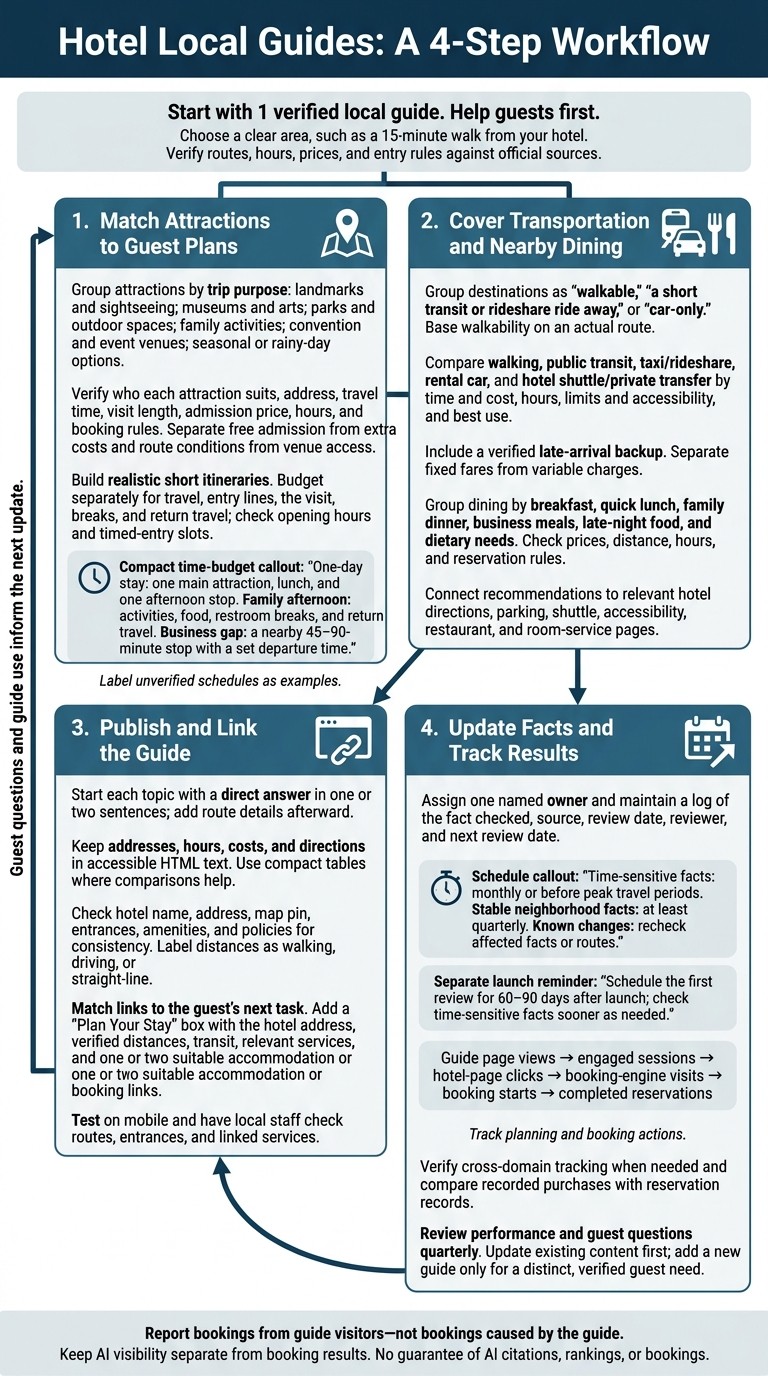
Hotel Local Guides: A 4-Step Workflow
Step 1: Match Attractions to Guest Plans
Group Attractions by Trip Purpose
Start with what guests ask most: what’s nearby, what fits their schedule, and what suits their trip. Group attractions into landmarks and sightseeing stops, museums and arts activities, parks and outdoor spaces, family activities, convention and event venues, and seasonal or rainy-day options. Explain who each category suits, and put destinations that make sense from your hotel’s location first.
Then add the details guests need to compare their options.
Include Routes, Costs, and Entry Rules
For each attraction, include who it suits, its address, travel time, visit length, admission price, hours, and booking rules. Separate free admission from extra costs, such as paid tours, parking, or booking fees. Link to the official ticket or reservation page, and flag last-entry times or security screening that could cut into the visit.
Keep route conditions separate from venue access details. That lets guests weigh the effort of getting there against access once they arrive. Include only verified mobility details.
Use this information to build sample itineraries that fit the time available.
Create Short, Realistic Itineraries
Build each plan around a time budget: one-day stays need one main attraction, lunch, and one afternoon stop; family afternoons need age-appropriate activities, food, restroom breaks, and return travel; business gaps between meetings need a nearby 45–90-minute stop with a set departure time.
Budget separately for travel, entry lines, the visit, breaks, and the return trip. Check the entire schedule against opening hours and timed-entry slots. Label unverified schedules as examples. Beside each plan, link to the hotel page for that trip type or use AI-powered booking optimization to convert interest into stays.
Step 2: Cover Transportation and Nearby Dining
After attractions, cover the next planning questions: how guests arrive, how they get around, and where they eat.
Compare Airport and Local Travel Options
Sort nearby places into three groups: walkable, a short transit or rideshare ride away, and car-only. Base “walkable” on an actual route. Include distance in miles, walking time, major crossings, hills, stairs, weather exposure, and step-free alternatives.
Help guests choose the easiest way to reach relevant airports, stations, and convention centers. Check official transit, airport, and venue pages for current hours and policies. Specify terminal pickup zones, station entrances, highway exits, and convention-center entrances. Explain how traffic, surge pricing, transfers, baggage, or event congestion may affect estimates.
Travel option | Time and cost | Hours | Limits and accessibility | Best use |
|---|---|---|---|---|
Walking | Route distance and walking time; free | N/A | Crossings, weather exposure, and step-free alternatives | Nearby attractions and restaurants |
Public transit | Total time, including transfers; fare per passenger | Scheduled service and last departure | Payment methods, luggage rules, and elevator information | Budget daytime travel |
Taxi/rideshare | Traffic-dependent time; metered fare or estimated vehicle price | Late-night availability | Pickup zones and accessible-vehicle availability | Direct airport or event travel |
Rental car | Driving time; daily rental, fuel, tolls, and parking costs | Rental desk hours | Shuttle access, garage height limits, and event restrictions | Regional trips or multiple stops |
Hotel shuttle/private transfer | Scheduled travel time; price per passenger or vehicle | Operating hours or booking window | Booking requirements, luggage limits, and accessible-service arrangements | Late arrivals or scheduled transfers |
For late arrivals, name a verified backup option for when transit stops running. Separate fixed fares from variable charges, and state whether parking allows in-and-out privileges. Confirm accessible vehicles, mobility-device policies, and any advance-notice requirements with the operator.
Then show guests where to eat, without leaving them to guess about distance, hours, or reservations.
Group Restaurants by Dining Need
Organize restaurants by meal need rather than cuisine: breakfast, quick lunch, family dinner, business meals, late-night food, and dietary needs. Include restaurant names, current prices, hours, and reservation rules. Separate walkable spots from those that require transportation so guests can compare convenience and booking requirements.
Dining group | Cuisine and price range | Distance and hours | Booking details |
|---|---|---|---|
Breakfast or quick lunch | Cuisine; dollar range per person, before tax and tip | Miles, walking minutes, and opening time | Walk-ins, takeout, and ordering options |
Family dinner | Cuisine; dollar range per entrée or family meal, before tax and tip | Walking distance or required ride; service hours | Reservations, high chairs, dress expectations, and verified access details |
Late-night or dietary options | Cuisine; dollar range per person, before tax and tip | Distance, walking time where practical, and kitchen closing time | Takeout, reservations, and documented dietary options |
Connect Travel and Dining to Hotel Services
Link arrival instructions to the hotel’s directions, parking, shuttle, and accessibility pages, where available. Connect dining recommendations to the hotel restaurant, room-service hours, and documented dietary options.
Check restaurant hours, prices, and reservation policies against official pages. Note whether prices exclude tax, tip, alcohol, or service charges, and ask guests to confirm ingredients and cross-contact with each restaurant.
When publishing, link these details to official local sources and the specific hotel pages that answer guests’ remaining travel questions.
Step 3: Publish and Link the Guide
Answer Guest Planning Questions Directly
Once you’ve verified the facts, publish them in a format guests can scan quickly. Use descriptive headings for airport arrivals, attraction access, and family dining. Start each topic with a direct answer in one or two sentences, then add route details.
Use compact tables only when guests need to compare options. Keep addresses, hours, costs, and directions in HTML text so guests and assistive technologies can read them.
Text-based pages help search and AI systems read your guide, but they don’t guarantee inclusion in AI answers. You don’t need an AI-specific file or schema.
Keep Hotel and Location Facts Consistent
Before publishing, check the hotel’s name, address, map pin, entrances, amenities, and policies against an approved fact sheet, hotel pages, Google Business Profile, and other listings. Label each distance as walking, driving, or straight-line.
Replace claims like “closest hotel” with measured route distances.
If you use structured data, make sure it matches the facts guests can see on the page.
Link to Relevant Hotel Pages
Match each link to the guest’s next task.
Attraction sections can lead to neighborhood, room, or family-amenity pages; arrival sections to directions, parking, and accessibility pages; dining sections to relevant hotel food services; and event sections to meeting-space or group-room pages.
Use descriptive anchor text that tells guests which page they’ll reach. Add a link only where it helps them take the next step.
At the end, add a short Plan Your Stay box with the hotel’s address, verified distances to key places, nearest transit options, and relevant hotel services. Include one or two accommodation or direct booking links that fit the guide’s audience.
Before publishing, test the page on mobile. Have a local staff member check the routes, entrances, and linked services.
Step 4: Update Facts and Track Results
After publishing, keep the guide current and track how guests use it to plan and book.
Assign an Owner and Review Schedule
Up-to-date facts help guests plan trips and support AI travel searches. Assign one named owner, such as the marketing manager, concierge lead, or revenue manager. That person should coordinate updates with front-desk, operations, food-and-beverage, and transportation staff.
Check time-sensitive details monthly or before peak travel periods. Review stable neighborhood details at least quarterly. When a known change affects facts or routes, recheck them.
Keep a maintenance log that records the fact checked, source used, review date, reviewer, and next review date. Show a last-verified date only after checking current time-sensitive details. Leave it off if the guide hasn't been fully reviewed.
Track Planning and Booking Actions
In Google Analytics 4, track the path from planning to increase direct hotel bookings: guide page views, engaged sessions, clicks to hotel pages, booking-engine visits, booking starts, and completed reservations. Tag each event with the guide URL, destination page, and context such as attraction category, device, and campaign.
If the booking engine uses another domain, verify cross-domain tracking. Compare recorded purchases with reservation records to check that they match.
Review performance quarterly using a documented attribution method and time window. Report bookings from guide visitors, not bookings caused by the guide. Note tracking gaps caused by cookie rejection, device switching, phone bookings, and external booking engines.
Keep AI visibility separate from booking results. Search Console includes AI Overviews and AI Mode in its broader Web reporting. Neither traffic growth nor a single AI reference proves that the guide generated additional bookings.
Use the results to decide whether to update the guide or create a new one.
Add Guides Based on Guest Questions
Let guest behavior shape the next update. Each quarter, review guest questions, messages, on-site searches, and guide clicks. Update an existing section when it meets the need. Create a new guide only for a distinct, verified use case.
Conclusion: Start With 1 Verified Local Guide
Start with one verified local guide before adding more. Keep it current after launch, and let actual guest demand shape any additions.
Link to the guide from relevant hotel pages using descriptive link text. Keep the next step one click away.
Before publishing, assign one person to own the guide and schedule its first review for 60–90 days after launch. Use guest questions and booking actions to decide what to update, and add only what guests actually use. Treat the guide as a guest service that needs regular care - not a guarantee of AI visibility.
FAQs
How can I verify walking routes without visiting them?
Use digital mapping tools and street-view services to check walking routes for pathways, terrain, distances, sidewalk conditions, accessibility, and nearby landmarks. Pair these virtual checks with your neighborhood knowledge to help guests choose routes to nearby attractions and restaurants. Add these details to your hotel’s local guides so guests have useful information they can trust.
What should I do when local sources disagree?
Use verified property details and official policies first. Let staff handle escalations, policy exceptions, and unresolved questions to keep answers accurate and protect guest trust.
Review logs of unanswered or problematic questions regularly. Use them to update your knowledge base and keep automated systems and local guides aligned with verified hotel information. When an answer is uncertain, give guests a direct way to reach staff for reliable, personalized help.
How can I tell which guide topics guests need most?
Review pre-stay and post-stay surveys, online reviews, booking trends, and questions guests ask your staff or AI chatbots. Look for repeated questions and shared interests to find the local guide topics guests need most.
Group guests by why they’re traveling - business, leisure, or family trips - and tailor topics to each group’s needs. Then use keyword research to find the local search terms potential guests use when planning their trips.
Related Blog Posts
Share:
20 years of hospitality lessons. No fluff. No spam
Join 500+ hospitality pros getting our best growth playbooks.

hi@sailtech.ai
36 East 31st Street, New York, NY 10016
© 2026 Sail. All rights reserved.