
Blog /
Marketing Strategy
Match rival hotel rates only after comparing full-stay costs, booking pace, and net contribution; use AI to test limited, profit-protecting changes.
By Shahar Rubin, Co-founder

I’d match a rival’s hotel rate only when the offers are comparable, bookings are behind forecast, and the lower price protects profit after booking and service costs. A cheaper headline rate alone isn’t a reason to cut yours.
In the article’s hypothetical example, a rival’s $185 room costs $281.50 after fees, assumed taxes, and parking - more than your $200 room’s $245 total. That’s why I’d compare <u>the full stay cost</u>, room features, and cancellation terms first.
Then I’d use three checks:
Match when demand is weak and added bookings can offset the revenue lost from discounting.
Hold when bookings are on track or guests have a reason to pay your price.
Increase when bookings exceed forecasts and rooms are running short.
I’d use AI to review rival prices alongside booking pace, inventory, cancellations, and channel costs - not let it change rates unchecked. Set price floors and approval rules, check direct-booking costs, and test limited changes against unchanged dates or room types. The measure that matters: added profit, not just more occupied rooms.
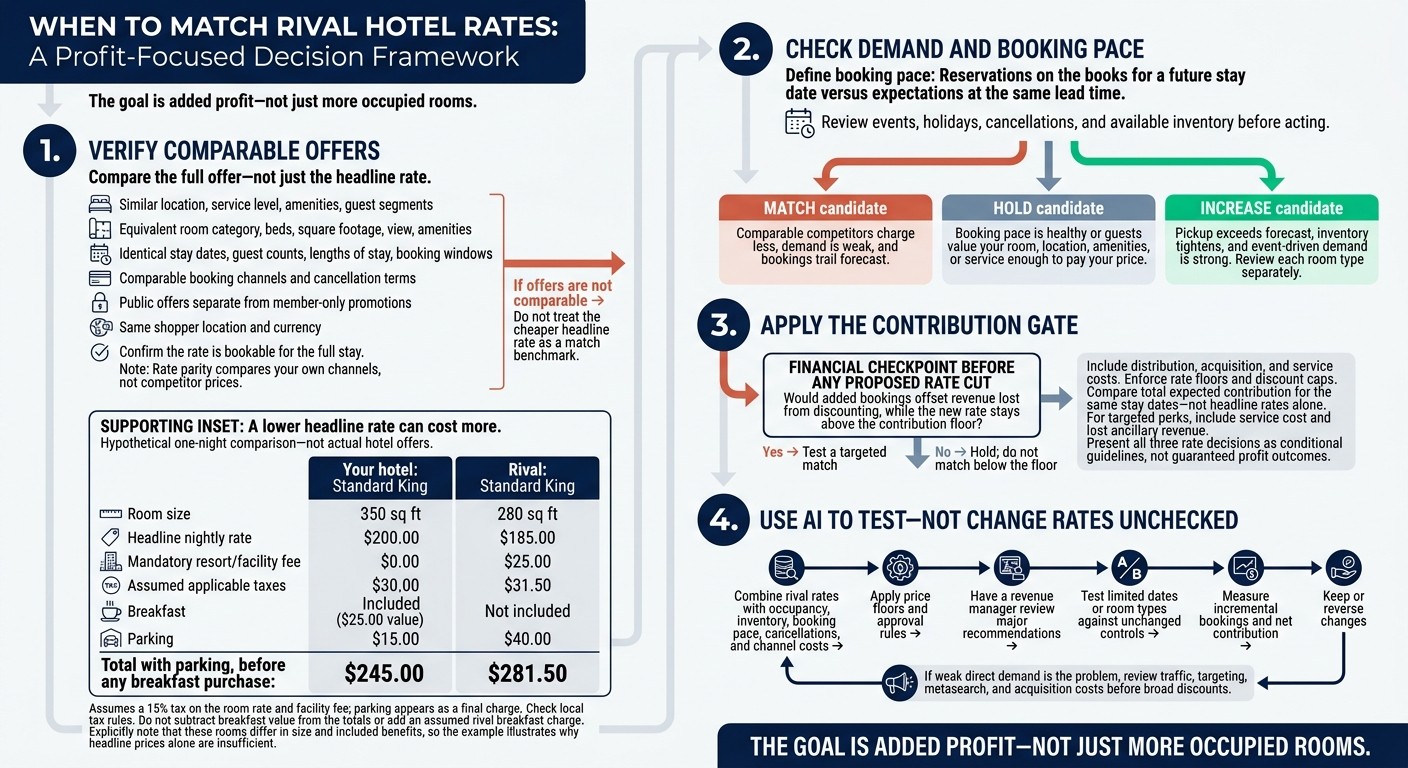
Hotel Rate Matching: Match, Hold, or Increase?
Hotel Pricing Strategy: Are Your Room Rates Too High or Too Low?
Check That Rival Offers Are Comparable
Build your competitive set around hotels guests would actually compare with yours: similar location, service level, amenities, and guest segments. Keep rate-parity checks separate - those compare your own channels, not your rates against competitors.
Check the room and booking terms first. Then compare what the guest will pay for the full stay.
Compare Room Features and Booking Terms
Match the room category, bed configuration, square footage, view, and amenities. Use identical stay dates, guest counts, lengths of stay, and booking windows. Check the booking channel and cancellation rules, and keep public offers separate from member-only promotions. Use the same shopper location and currency, since rates can vary by point of sale.
A larger room or more flexible cancellation rules may justify a higher rate. Treat a lower price as a match only when the rooms and terms are equivalent.
Compare Total Stay Costs and Included Benefits
Compare the total stay cost, not just the headline rate. Also account for included benefits the guest would use.
The hypothetical one-night example below assumes a 15% tax on the room rate and facility fee. Parking appears as a final charge. Check local tax rules before making your own comparison.
Hypothetical comparison - not actual hotel offers
Cost or feature
Your hotel: Standard King
Rival: Standard King
Room size
350 sq ft
280 sq ft
Headline nightly rate
$200.00
$185.00
Mandatory resort/facility fee
$0.00
$25.00
Assumed applicable taxes
$30.00
$31.50
Breakfast
Included ($25.00 value)
Not included
Parking
$15.00
$40.00
Total with parking, before any breakfast purchase
$245.00
$281.50
If a rate isn't bookable for the full stay, don't use it as a benchmark. For offers that pass these checks, weigh demand and booking pace before deciding whether to match. This data-driven approach is a core component of hotel booking optimization using AI.
Base Rate Decisions on Demand and Booking Pace
Once offers are comparable, use booking pace to decide whether to match, hold, or increase rates. Booking pace compares reservations on the books for a future stay date against expectations at the same lead time.
Check events, holidays, and cancellations before responding to a pace gap. Then confirm that a lower rate would still protect profit and boost direct bookings.
Match Rates When Demand Is Weak
Match when comparable competitors charge less, bookings trail forecast, and the new rate stays above your contribution floor. Test price only when search traffic is strong but conversion is weak. Keep the test focused on affected dates, room types, or segments instead of discounting the entire property.
Hold Rates When Your Rooms Justify the Price
Hold your rate when guests value your location, room quality, amenities, or service enough to pay the current price. Also hold when booking pace is healthy or matching would put you below your margin floor.
If you test a targeted perk instead, calculate its service cost and any lost ancillary revenue before offering it. As demand strengthens, move from holding rates to increasing them by room type.
Increase Rates When Demand Exceeds Supply
Increase rates rather than match when pickup exceeds forecast, inventory tightens, and event-driven demand is strong. Review each room type separately, restrict lower-priced offers as demand grows, and reassess pickup after each change.
Check Contribution Before Matching Rates
Once you confirm the offers are comparable, check whether the lower rate still pays off. More occupancy doesn’t always mean more profit. A rate cut and booking costs can wipe out the gain.
Run that check before changing any rate.
Set Minimum Acceptable Rates and Discount Caps
Set and enforce rate floors and discount caps based on contribution after distribution, acquisition, and service costs. Compare net room revenue, not headline rates. Audit channel costs to verify what you spend to acquire each booking.
Compare the Financial Impact of Each Rate Decision
For every stay date, ask the same three questions: Can you match, should you hold, or should you increase? A lower rate makes sense only when weak demand calls for more bookings and those bookings still clear your floor.
Decision | When it fits | Contribution impact |
|---|---|---|
Match | Comparable offers, weak demand, and bookings behind target | Positive only if added demand outweighs revenue lost by lowering rates. |
Hold | Your room justifies a premium or booking pace is healthy | Protects margin. |
Increase | Strong demand, bookings ahead of target, and scarce inventory | Maximizes contribution. |
These are conditional guidelines, not automatic rules. Compare total expected contribution for the same stay dates - not just the new rate.
Use AI dynamic pricing tips to test these tradeoffs before changing live rates.
Use AI to Review and Test Rate Changes
Combine Rival Rates With Hotel Booking Data
Once you’ve set rate floors, use AI to test how rival rates affect bookings and margin. Have AI normalize rival rates, room types, and booking terms, then compare them against your hotel’s occupancy, inventory, booking pace, and cancellations. Check whether a lower rate actually improves net contribution.
Measure Booking Results and Contribution
Track incremental bookings and net contribution, not just occupancy. Filling more rooms isn’t the only measure of a rate change’s success.
Support Direct Bookings Without Broad Discounts
If weak direct demand is causing the gap, address channel performance before cutting rates across all dates and room types. When low direct traffic limits bookings, improve hotel metasearch marketing and targeting.
Sail helps hotels run AI-powered campaigns on Facebook, Instagram, and metasearch without upfront ad spend. Include acquisition costs when calculating direct-booking contribution.
Conclusion: Match Rates Only When Demand and Margins Allow
Match rival rates only when rooms and total stay costs are comparable, booking pace is weak, and the lower rate stays above your contribution floor.
Hold your rate when room quality justifies the premium or a price match would fall below your contribution floor. Increase rates when bookings outpace forecasts and room inventory is tight. These pricing adjustments should be part of your broader hotel marketing strategies to maintain brand value.
Have a revenue manager review major AI recommendations before acting. Test changes on a limited set of dates or room types, using unchanged dates or room types as controls. Keep or reverse the changes based on incremental bookings and contribution.
FAQs
How many extra bookings would make a rate cut profitable?
The number depends on each reservation’s net contribution. A rate cut pays off only when added room nights bring in enough net revenue to outweigh the profit lost to lower rates.
To check, subtract discounts, OTA commissions, ad spend, labor, amenities, payment fees, and service-recovery costs from the added room revenue. Then compare that net amount with your control period. More bookings help only if they increase profit without hurting the guest experience.
How can I tell if price is hurting bookings?
Watch for a Market Penetration Index (MPI) below 100, which means bookings are below your fair market share. Other warning signs include fewer bookings after a price change, a growing gap between your rates and market averages, or more cancellations.
Check website conversion rates and guest feedback on value. Compare booking pace, occupancy, and Average Daily Rate (ADR) against historical patterns and year-over-year trends. Track net contribution - not just bookings - to protect profitability.
How long should I test an AI-recommended rate?
Run the AI tool alongside your existing reports for two to four weeks, with live rate updates turned off. Check that data connections are accurate and settings are correct.
Next, run a controlled test with a small share of your inventory - typically 5% to 10%. Compare performance with your baseline metrics each week before expanding the approach.
Related Blog Posts
Share:
20 years of hospitality lessons. No fluff. No spam
Join 500+ hospitality pros getting our best growth playbooks.

hi@sailtech.ai
36 East 31st Street, New York, NY 10016
© 2026 Sail. All rights reserved.