Blog /
Marketing Strategy
Five metrics—MAPE, WAPE, MAE, RMSE, and bias—reveal forecast misses, skew, and severe errors to drive better hotel decisions.
By Shahar Rubin, Co-founder

I use five metrics to check hotel forecasts - not one “accuracy” score. Together, they show how far forecasts miss, whether large errors drive the results, and whether predictions run too high or too low.
MAPE: Average percentage error; skip it when actual demand is zero.
WAPE: Total absolute error as a percentage of total demand; works with individual zero-demand dates, but not zero total demand.
MAE: Average miss in rooms, room nights, or dollars.
RMSE: Gives large misses more weight.
Bias: Shows direction - positive means overforecasting; negative means underforecasting.
Quick Comparison
Metric | What I check | Main caution |
|---|---|---|
MAPE | Percentage miss per observation | Small actuals can inflate results |
WAPE | Error relative to total volume | High-volume groups can hide other problems |
MAE | Average miss in target units | Hotel size affects the score |
RMSE | Weight of large misses | One extreme miss can dominate |
Bias | Over- or underforecasting | Opposite errors can cancel out |
I compare like-for-like targets at 90, 60, 30, 14, and 7 days before arrival, using saved forecasts and matching actuals. I keep sold-room results separate from estimates of unmet demand, then review errors by property, segment, and lead time against fixed baselines.
<u>The goal is better decisions, not just better reports.</u> Persistent errors tell me where to review pricing, staffing, inventory, or marketing and retargeting - and percentage error above 100% is a reminder not to label “100% minus error” as accuracy.

5 Hotel Forecast Accuracy Metrics Compared
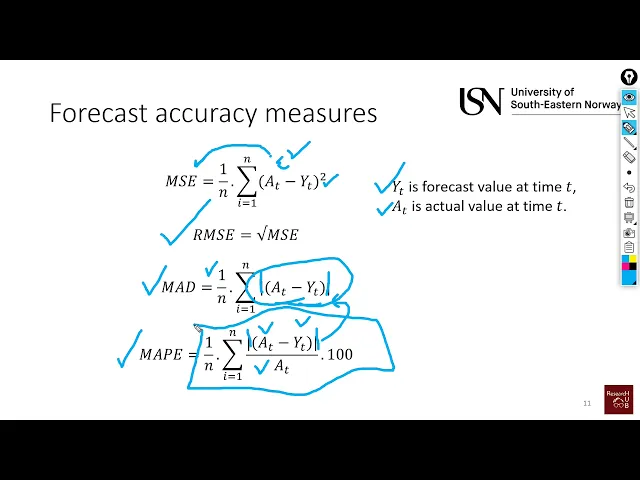
Forecasting (7): Forecast accuracy measures (MSE, RMSE, MAD & MAPE)
Define Forecast Targets, Actuals, and Lead Times
Before scoring accuracy, set the target, actual, and lead time. This keeps MAPE, WAPE, MAE, RMSE, and bias comparable.
For each matched observation, let (A_t) represent actual demand, (F_t) represent forecast demand, and (e_t = F_t - A_t) represent forecast error. Let (n) be the total number of observations. Actuals and forecasts must measure the same target. Use the same error convention for every metric: positive means overforecasting; negative means underforecasting.
Archive forecasts at fixed lead times. Score each horizon separately to see where accuracy breaks down. Match each saved forecast to its actual arrival date and room type. Keep units, aggregation, and cancellation rules consistent across horizons.
Use a consistent format for dates, currency, and units. Label each target as rooms, room nights, occupancy, or another single metric. Never mix target types in one calculation.
Keep constrained occupancy separate from unconstrained demand. Sold-out nights cap observed room sales, while turnaways help estimate unmet demand. Treat unconstrained demand as an estimate - not an actual - and evaluate it separately.
1. MAPE: Mean Absolute Percentage Error
Calculation
MAPE = 100 × mean(|F_t − A_t| / A_t). MAPE expresses the average absolute forecast error as a percentage of actual demand. Lower is better.
Hotel Uses
MAPE works best for active segments with nonzero demand. Include it in your weekly forecast scorecard to explain forecast performance to revenue managers and owners. Avoid it for room types or segments that often have zero-demand periods.
Low Volume and Large Misses
Small denominators can inflate percentage errors in low-volume segments. That means even a small miss can look large.
MAPE can also make underforecasting look safer. With nonnegative forecasts, underforecast error cannot exceed 100%, but overforecast error has no upper limit.
Limits and Supporting Metrics
MAPE is undefined when actual demand is zero. List any periods and segments you exclude. Pair it with MAE for low-volume demand, RMSE for large misses, and bias to show the direction of errors.
When zero-demand periods are common, use WAPE instead - as long as total actual demand is greater than zero.
2. WAPE: Weighted Absolute Percentage Error
When MAPE breaks down on sparse demand, WAPE gives a clearer portfolio-level view.
Calculation and Unit
WAPE = 100 × Σ|F_t − A_t| / ΣA_t.
It measures total absolute error as a percentage of total actual volume.
Hotel Uses
Use WAPE at the property and portfolio levels, and for demand groups such as transient, group, and corporate. It works well as a top-line reporting score. Sum absolute errors first - don't average segment WAPEs.
Effects of Volume and Large Errors
WAPE doesn't divide by each observation's actual demand, so individual zero-demand dates don't break the metric. Large misses still increase WAPE, but it doesn't square errors the way RMSE does.
Limits and Supporting Metrics
WAPE is undefined when total actual demand is zero. Good results in high-volume groups can also hide problems in low-volume groups.
Use WAPE as the top-line portfolio metric, then check results by property, segment, and lead time. Review property and segment WAPE alongside the portfolio score. Add MAE to show misses in units and bias to track over- or under-forecasting.
3. MAE: Mean Absolute Error
When percentage metrics are noisy, MAE shows the average forecast miss in the units you use.
Calculation and Unit
MAE = mean(|F_t − A_t|) = Σ|F_t − A_t| / n.
MAE reports the average miss in rooms, room nights, or dollars. Absolute values give over- and under-forecasts equal weight, so they can’t cancel each other out.
Hotel Uses
Use MAE to measure misses in hotel operating units. Track it by property and lead time, scoring each lead time separately.
Effects of Volume and Large Errors
MAE is scale-dependent. Unlike RMSE, it weights each miss linearly rather than giving extra weight to larger errors.
Limits and Supporting Metrics
Don’t compare hotels of different sizes using raw MAE. It still works when actuals are zero, making it a baseline unit metric. Pair it with RMSE to check whether rare large misses are driving the average, and with bias to show the direction of errors.
4. RMSE: Root Mean Square Error
Calculation and Unit
RMSE = √mean((F_t − A_t)²). Square each error, average the squared errors, then take the square root. This puts RMSE in the same units as the forecast target.
Hotel Uses
Use RMSE on your scorecard to flag rare but costly forecast misses.
These may occur during holidays, events, or cancellation spikes.
Trace each spike back to the dates behind it. Pair RMSE with MAE to tell routine noise apart from rare, costly misses.
Effects of Volume and Large Errors
Squaring gives large misses more weight. Compare RMSE and MAE over the same dates. Similar values suggest fairly even error sizes; a larger gap points to a few severe misses. Raw scores aren't useful for ranking hotels with very different room counts.
Limits and Supporting Metrics
A single outlier can push RMSE up, but RMSE doesn't show forecast direction. Use bias alongside it to check whether misses tend to run high or low - mostly overforecasts or underforecasts.
5. Forecast Bias: Over- and Under-Forecasting
Bias rounds out the scorecard by showing whether forecasts tend to run high or low. Bias = mean(F_t − A_t). Positive values mean overforecasting; negative values mean underforecasting. Report bias in the same units as the forecast target: room nights, revenue, or occupancy.
Positive bias can lead to rates set too high, overstaffing, inventory held for demand that never arrives, and delayed promotions. Negative bias can lead to rates set too low, understaffing, early sellouts that block higher-value demand, and unnecessary discounts.
Offsetting errors can cancel each other out, so near-zero bias doesn't prove accuracy.
Track bias by room type, booking channel, group versus transient business, and lead time to spot hidden patterns. Use these breakdowns to build the scorecard by target and lead time.
Build a Hotel Forecast Accuracy Scorecard
Combine the metrics into one scorecard organized by purpose, forecast horizon, and segment. Give each metric a specific job rather than blending them into a single score: WAPE or MAPE for percentage error, MAE for average miss size, RMSE for severe misses, and bias for direction.
Metric | Formula | Unit | Best use | Main limit | Interpretation |
|---|---|---|---|---|---|
MAPE | (100/n) × Σ(∣F − A∣ / A) | % | Reporting average percentage error | Undefined when any actual is zero; small actuals inflate results | Lower means smaller percentage misses. |
WAPE | 100 × Σ∣F − A∣ / ΣA | % | Reporting error relative to total demand | High volume can hide low-volume problems; undefined when total actuals are zero | Total absolute error relative to total demand. |
MAE | (1/n) × Σ∣F − A∣ | Room nights or dollars | Measuring average planning misses | Does not adjust for property size | Average absolute miss in target units. |
RMSE | √[(1/n) × Σ(F − A)²] | Room nights or dollars | Highlighting severe misses | A single large error can dominate | Weights large misses more than MAE. |
Bias | (1/n) × Σ(F − A) | Room nights or dollars | Tracking error direction | Offsetting errors can hide misses | Positive means overforecasting; negative means underforecasting. |
Do not subtract percentage error from 100% and call the result “accuracy.” Percentage error can exceed 100%.
Score each metric at 90, 60, 30, 14, and 7 days before arrival, matching archived forecast snapshots to finalized actuals. Keep the reporting window and definitions consistent. That way, changes reflect forecast performance - not a change in how you built the report.
Break out results by property, room type, segment, channel, weekday, season, and event period, rather than relying on hotel-wide totals. If individual days have zero actual demand but total actual demand is positive, favor WAPE over MAPE. If total actual demand is zero, report MAE and mark percentage error as undefined.
Demand mix can shift the headline percentage even when performance within each segment stays the same. Compare error size and direction across like-for-like segments and lead times.
Use the scorecard results to set baselines, alerts, and corrective actions.
Set Baselines, Alerts, and Corrective Actions
Use the scorecard to compare current results against a fixed baseline matched to the season and forecast horizon. Record the baseline period, and keep it unchanged throughout each review cycle.
Choose one percentage metric - MAPE or WAPE - and don’t combine them. Keep signed bias separate so you can see both overforecasting and underforecasting. Check the underlying metrics, too: an acceptable WAPE can hide large misses that RMSE reveals.
Set property-specific alert thresholds and persistence rules. When a threshold is breached, use these triggers to guide your review:
Bias persists: Review demand shifts and lead-time assumptions.
WAPE spikes: Check data quality and horizon alignment.
RMSE spikes: Inspect the largest misses, especially on event dates.
Correct any verified data or model issues, then review the next comparable reporting window.
Conclusion: Review Error Size and Direction Together
MAPE and WAPE measure percentage error. MAE shows the average miss in rooms or dollars. RMSE highlights severe misses, while bias tells you whether forecasts run high or low.
Use the scorecard to compare results with fixed baselines for each target and lead time. Review results by property, segment, and channel each month - not just the property-wide average.
When errors persist, act on them. Use the scorecard to guide decisions, not just reporting. Let recurring errors inform changes to pricing, staffing, inventory, and marketing. These adjustments are essential to increase hotel direct bookings and reduce reliance on third-party channels.
FAQs
What forecast error thresholds should my hotel use?
There’s no universal threshold for forecast error. Regularly compare actual occupancy with AI predictions and track the gap to refine your models. Aim for 100% price accuracy; anything below 95% is considered low.
Review performance daily, weekly, monthly, and quarterly. Adjust your approach based on booking pace and RevPAR trends, and pair AI insights with human expertise to account for your hotel’s market conditions.
What should I do when forecast metrics disagree?
Don’t rely on a single metric. Pair AI insights with human expertise to make sense of market conditions and keep forecasts aligned with your business goals. Audit and clean source data regularly - poor-quality inputs often lead to conflicting signals.
Use your accuracy scorecard to track key indicators consistently, including occupancy rates and RevPAR. Keep AI models updated with new data to maintain reliability and performance.
How much data do I need to evaluate forecast accuracy?
Use 90 to 365 days of historical data to check forecast accuracy. Include dates, room types, rate plans, bookings, cancellations, no-shows, and revenue. Before you analyze the data, reconcile records across your property management system, booking engine, and channel systems.
Using the same historical window gives you a reliable baseline to measure forecast accuracy against your occupancy, average daily rate (ADR), and revenue per available room (RevPAR) targets.
Related Blog Posts
Share:
20 years of hospitality lessons. No fluff. No spam
Join 500+ hospitality pros getting our best growth playbooks.

hi@sailtech.ai
36 East 31st Street, New York, NY 10016
© 2026 Sail. All rights reserved.